






















How to Monitor and Manage Dyness Home Energy Storage System Power Usage via Mobile App


Get notified about new updates, products, tips and tutorials. No spam.
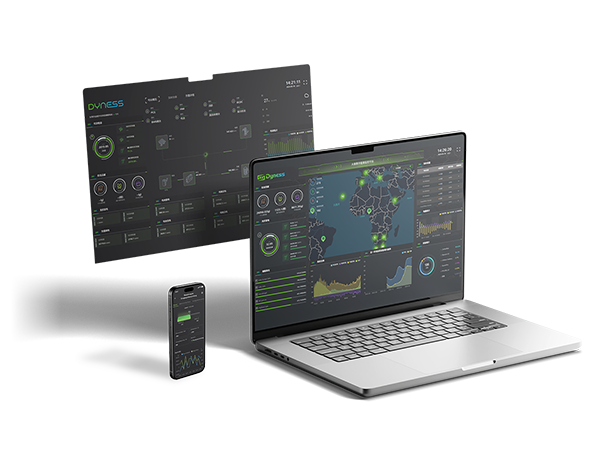
A mobile app or monitoring platform can help users better understand how their Dyness home energy storage system is working every day. Depending on the product configuration, inverter connection, monitoring device, and local platform support, users may be able to view battery status, solar generation, household consumption, grid import and export, charging and discharging behavior, and system alerts.
For homeowners, mobile monitoring turns the battery system from a hidden electrical device into a more visible energy management tool. It helps users understand when solar power is stored, when the battery discharges, how much energy is used at night, and whether the system is operating normally.

Why Mobile Monitoring Matters for Home Energy Storage
A home energy storage system works continuously in the background. It may charge from solar power during the day, discharge in the evening, support backup loads during outages, or operate according to time-of-use electricity prices.
Without monitoring, users may only see the result on their electricity bill. With a mobile app or cloud platform, users can better understand how energy moves between solar panels, the battery, household loads, and the grid.
Mobile monitoring helps users answer practical questions: Is the battery charging properly? How much solar power is being used by the home? When does the battery discharge? Is the system importing electricity from the grid? Are there any abnormal alerts?
For Dyness users, app-based monitoring can support better daily energy awareness, easier troubleshooting, and more informed decisions about battery settings, backup reserve, and future capacity expansion.
What Users Can Usually Monitor Through the App
The specific data shown in the app depends on the Dyness product, inverter, communication device, meter configuration, and monitoring platform. In a typical solar-plus-storage system, users may be able to monitor several key energy indicators.
| Monitoring Item | What It Helps Users Understand |
|---|---|
| Battery SOC | Shows the battery’s state of charge, helping users understand how much stored energy is available. |
| Charging and discharging power | Shows whether the battery is charging, discharging, or staying idle at a given moment. |
| Solar PV generation | Helps users see how much solar energy is being generated and whether surplus power is available for storage. |
| Household load consumption | Shows how much electricity the home is using and when demand is highest. |
| Grid import and export | Helps users understand when the home buys electricity from the grid or sends surplus power back to the grid. |
| Historical energy data | Allows users to review daily, monthly, or seasonal energy trends and evaluate solar self-consumption performance. |
| System status and alerts | Provides visibility into operating status, warning messages, communication issues, or abnormal conditions where supported. |
These data points help users understand not only whether the system is working, but also how well it is matching household energy habits.

How the App Helps Manage Daily Power Usage
Monitoring is only the first step. The greater value comes from using energy data to improve daily power management.
For a home with solar PV, the app can help users see whether surplus solar energy is being stored in the battery instead of being exported or unused. In the evening, users can check whether the battery is discharging to support household loads and reduce grid electricity purchases.
For homes with time-of-use electricity tariffs, monitoring data can also help users understand whether the battery is charging or discharging during the intended price periods, depending on inverter and EMS configuration.
| User Goal | How App Monitoring Helps |
|---|---|
| Improve solar self-consumption | Users can check how much solar power is stored and later used by household loads. |
| Reduce grid dependency | Grid import data helps users identify when the home still relies heavily on grid electricity. |
| Manage backup reserve | Where supported, users can understand whether enough battery energy is being reserved for backup needs. |
| Evaluate system sizing | If the battery is often full early or empty too quickly, users may need to review capacity, load habits, or expansion plans. |
| Support troubleshooting | Historical data, alerts, and operating records can help installers or technical teams diagnose problems more efficiently. |
Some settings may need to be configured by installers or through the inverter platform rather than directly by end users. Users should always follow the official guidance for their specific product, inverter, and monitoring system.
What to Check Before Using App Monitoring
To use mobile monitoring effectively, the system must be correctly installed, connected, and configured. If the app data is incomplete or inaccurate, the issue may not be the battery itself. It may be related to the monitoring setup, meter connection, inverter communication, or network condition.
| Check Item | Why It Matters |
|---|---|
| Account and device binding | The battery, inverter, or monitoring device must be correctly linked to the user account or installer platform. |
| Battery-inverter communication | Correct BMS communication is needed for SOC, charge limits, discharge limits, alarms, and battery status to display properly. |
| Meter or CT installation | Grid import, export, and household load data depend on correct meter or current transformer installation where required. |
| Network connection | Wi-Fi, LAN, or cellular connection affects whether data can be uploaded to the monitoring platform in time. |
| Platform compatibility | The available app functions may depend on the inverter brand, monitoring platform, region, and product configuration. |
Users should treat app data as a practical energy management reference. For billing settlement, grid metering, warranty diagnosis, or system faults, official meters, installer checks, and Dyness technical support should be used where required.
Common Misunderstandings About App-Based Energy Management
Myth 1: The app can control every part of the energy storage system directly.
Not always. Some functions may be available to end users, while others may require installer access or inverter-side configuration. Control permissions depend on product design, system settings, and platform rules.
Myth 2: If the app is offline, the battery system has stopped working.
Not necessarily. A network issue may interrupt data upload, but the local energy storage system may continue operating according to its existing configuration. Users should check system indicators or contact the installer if the app remains offline.
Myth 3: App data is always the same as the electricity bill.
Monitoring data and utility billing data may differ because they use different meters, sampling intervals, calculation methods, and measurement boundaries. App data is useful for energy management, but it should not automatically be treated as the official billing record.
Myth 4: A high SOC always means the system is optimized.
A full battery may be good before a planned outage, but if the battery remains full every day while solar power is still exported, the system may not be fully optimizing self-consumption. SOC should be interpreted together with PV generation, load demand, tariff periods, and backup reserve settings.
Myth 5: Users should change advanced parameters whenever performance looks unusual.
Changing system parameters without professional guidance may affect safety, performance, or warranty conditions. If abnormal data, alarms, or unexpected operating behavior appears, users should contact the installer or authorized service channel.
Final Takeaway
Mobile app monitoring helps Dyness home energy storage users better understand how their system charges, discharges, stores solar energy, supports household loads, and interacts with the grid.
By checking SOC, PV generation, household consumption, battery power, grid import and export, historical trends, and system alerts, users can make more informed decisions about energy usage, backup reserve, and future battery expansion.
The exact app functions depend on the Dyness product, inverter platform, monitoring device, communication setup, region, and installer configuration.
For the best experience, users should ensure the system is properly commissioned, the monitoring device is correctly connected, the meter data is accurate, and any advanced settings are adjusted only according to official guidance or professional installer support.
FAQ
-
Q: Can I monitor my Dyness home energy storage system through a mobile app?

A: In many supported configurations, users can monitor battery status and energy flow through a mobile app or monitoring platform. Available functions depend on the Dyness product, inverter brand, monitoring device, region, and system configuration.
-
Q: What information can I usually see in the app?
A: Users may be able to view battery SOC, charging and discharging power, PV generation, household load consumption, grid import and export, historical energy data, system status, and alerts, depending on the monitoring setup.
-
Q: Can I change battery settings through the app?
A: Some settings may be available to users, while advanced settings may require installer access or inverter-side configuration. Users should avoid changing technical parameters without professional guidance.
Learn More